



A Power Distribution Unit (PDU) manages and distributes electrical power. A 基本的なPDU provides straightforward power distribution to multiple devices, including servers and networking equipment. This ensures each device receives the necessary electricity. Basic PDUs are essential for small businesses and home labs. They prevent costly IT downtime. Downtime can cost small businesses an estimated $427 per minute. Reliable power distribution from a Basic PDU maintains critical IT operations.
キーテイクアウト
- 基本的なpdus give power to many IT devices. They stop costly IT system shutdowns.
- Basic PDUs protect devices from too much power. They have circuit breakers that turn off power if needed.
- These PDUs are simple to use and reliable. They are also cheap for basic power needs.
- Choose a PDU with the right power amount. Make sure it has enough outlets for your devices.
- Consider the PDU’s size. It should fit your server rack or workspace.
- Look for PDUs with surge protection. This protects your devices from sudden power spikes.
- Always check the PDU’s build quality. A strong metal case makes it last longer.
- Buy PDUs from trusted brands. Make sure they offer good warranties and support.
基本的な PDU 機能の理解

Core Role of a Basic PDU
Power Distribution to IT Equipment
A Basic PDU serves as a fundamental component for 配電 within IT environments. It receives power input from various sources, such as a wall outlet, a generator, or an uninterruptible power supply (UPS). The PDU then distributes this power to multiple outlets. These outlets are typically located within a server rack, allowing IT equipment to draw the necessary electricity. A Basic PDU functions similarly to a robust power strip, enabling numerous devices to draw power from a single source. It ensures the correct voltage and current reach each connected device, powering servers, switches, and other critical IT gear efficiently.
Overload Protection for Connected Devices
Basic PDUs also provide essential overload protection for connected devices. They incorporate circuit breakers that trip if the total current draw exceeds the PDU’s rated capacity. This mechanism prevents damage to the PDU itself and the valuable IT equipment it powers. Overload protection safeguards against potential electrical hazards and ensures the stability of the power supply. It is a crucial feature for maintaining the integrity of a small business or home lab IT infrastructure.
Key Characteristics of Basic PDUs
Simplicity and Reliability
基本的なpdus are known for their simplicity and inherent reliability. They perform their core function of power distribution without complex features like remote monitoring or individual outlet control. This straightforward design contributes to their robust nature and reduces potential points of failure. Despite their simplicity, these devices adhere to strict electrical safety standards. For instance, they often comply with international standards such as IEC 62368-1, which focuses on product safety evaluation, and FCC Compliance (Class A devices under Part 15), ensuring minimal electromagnetic interference. Such adherence guarantees their reliable and safe operation within any IT setup.
Cost-Effectiveness for Essential Power Needs
Basic PDUs offer a highly cost-effective solution for essential power distribution needs. Small businesses and home labs often operate with budget constraints. Basic PDUs provide a reliable and efficient way to power multiple devices without the higher investment required for more advanced PDU types. They deliver fundamental power management capabilities, making them an ideal choice for organizations seeking to establish or expand their IT infrastructure economically. Their affordability does not compromise their ability to deliver consistent and protected power to critical equipment.
Top 10 Basic PDU Solutions for Small Business and Home Labs

Rackmount Basic PDU Options
NBYOSUN 8-Outlet Rackmount Basic PDU
The NBYOSUN 8-Outlet Rackmount Basic PDU offers a dependable power delivery solution for small server rooms and offices. This PDU provides reliable power without complex monitoring features, simplifying operations for businesses. Its robust construction features a durable aluminum alloy casing. This casing protects against impacts, fire, and rust, ensuring long-term reliability. The PDU includes an overload protection system. This system automatically shuts off power during over-current or over-temperature conditions, safeguarding connected devices. It also offers versatile mounting options, allowing wall-mounting or attachment to furniture. The unit provides eight French-style wide outlets, accommodating multiple devices simultaneously. A 2-meter heavy-duty power cord enhances placement flexibility. A manual switch and circuit breaker add convenience and control.
Eaton EBA101-10 Basic PDU
The Eaton EBA101-10 Basic PDU delivers essential power distribution for IT equipment. This unit provides 1.44 kW of power at 120V, delivering 12A. It features a NEMA 5-15P plug with a 10 ft (3 m) cord for its input connection. The PDU offers 10 NEMA 5-15R receptacles for output. An integrated 15A circuit breaker provides overload protection, safeguarding connected devices from power surges. This PDU is a straightforward and reliable choice for powering multiple devices in a rack.
Tripp Lite Basic Rackmount PDU
Tripp Lite offers dependable, worry-free AC power distribution to multiple devices with its Basic Rackmount PDU. This PDU features a rugged design built for high reliability. It provides multiple outlet configurations, catering to various power needs. Some models support optional surge protection, adding an extra layer of safety for connected equipment. Its compact, no-network simplicity makes it ideal for environments where remote monitoring is not required. This PDU is perfect for offices, small server rooms, or simple network closets.
Vertical Basic PDU Solutions
0U Vertical Basic PDU for Space Saving
Vertical PDUs, also known as Zero-U PDUs, mount in the vertical space of a server rack. This design frees up horizontal rack space, maximizing density for IT equipment. It eliminates the need for traditional horizontal PDUs that occupy valuable rack units. This allows more equipment within the same rack. The vertical mounting design also enhances airflow by removing obstructions from the horizontal space. This improves cooling efficiency for devices and can lower energy costs. It also reduces cable clutter, keeping power cords neatly aligned. This simplifies maintenance tasks and improves organization.
High-Density Vertical Basic PDU
High-density vertical PDUs optimize power distribution in crowded server racks. These units maximize utility by supporting up to 42 outlets. Their vertical mounting design frees up horizontal rack areas, making them ideal for high-density environments. This configuration also significantly improves cable management. It minimizes clutter and enhances airflow within the rack. These PDUs provide robust power delivery for numerous devices while conserving critical rack space.
Desktop and Under-Desk Basic PDU Choices
Wattbox Switched Basic PDU
The Wattbox Switched Basic PDU offers convenient power distribution for desktop and under-desk setups. While primarily a basic power strip, its switched outlets provide individual control over connected devices. This feature allows users to power on or off specific equipment without unplugging cords. It simplifies power management for workstations and small office environments. This PDU delivers reliable power to multiple devices in a compact form factor.
Compact Basic PDU for Workstations
A compact Basic PDU provides essential power distribution for individual workstations or small office setups. Its small size allows for easy placement on a desk or discreetly under it. These PDUs typically offer multiple standard outlets, allowing users to power computers, monitors, and peripherals from a single unit. They ensure organized power delivery without occupying much space. This makes them ideal for environments with limited room.
Specialized Basic PDU Configurations
Basic PDU with Multiple Outlet Types
Some Basic PDUs offer a variety of outlet types. This configuration addresses the diverse power requirements of IT equipment. For example, a single PDU might include standard NEMA 5-15R outlets for common devices like monitors and network switches. It could also feature IEC C13 or C19 outlets. These outlets specifically power servers, storage arrays, and other high-density equipment. This versatility eliminates the need for multiple power strips or adapters. It simplifies cable management and ensures proper power delivery to all connected devices. Businesses benefit from this flexibility. They can power a mixed environment of IT gear efficiently from one unit.
Heavy-Duty Basic PDU for Demanding Loads
Heavy-duty Basic PDUs provide robust power distribution for demanding IT loads. These units typically feature higher amperage ratings, such as 20A or 30A. They handle more power-intensive equipment. Their construction often includes thicker gauge wiring and more durable components. This design ensures reliable operation under continuous high loads. Businesses use these PDUs in environments with high-density server racks or specialized equipment. Such equipment includes powerful graphics workstations or industrial control systems. A heavy-duty PDU ensures stable power delivery. It prevents overloads and maintains operational continuity for critical applications.
Basic PDU with Enhanced Protection
Basic PDU with Integrated Surge Protection
A Basic PDU with integrated surge protection offers an essential layer of defense for connected IT equipment. Power surges, or transient voltage spikes, can occur due to lightning strikes, utility grid fluctuations, or even the cycling of large electrical appliances. These sudden increases in voltage can severely damage sensitive electronics. An integrated surge protector diverts excess voltage away from connected devices. It safely dissipates this energy. This feature safeguards valuable servers, switches, and other components from costly damage. When selecting such a PDU, users should consider its joules rating. A higher joules rating indicates greater surge absorption capacity. This provides enhanced protection for critical infrastructure.
💡 ヒント: Always check the joules rating on a surge-protected PDU. A higher rating offers better protection against powerful electrical surges.
Key Features to Consider When Choosing a Basic PDU
Selecting the right power distribution unit requires careful consideration of several key features. Businesses must match the PDU’s capabilities to their specific IT infrastructure needs. This ensures efficient power delivery and protects valuable equipment.
Power Capacity and Input Plug Types for Your Basic PDU
Amperage Ratings (15A, 20A)
The amperage rating of a PDU determines the total power it can safely deliver. Common ratings include 15A and 20A. A 15A PDU suits smaller setups with fewer devices or lower power requirements. A 20A PDU handles more power-intensive equipment or a larger number of devices. Always ensure the PDU’s amperage rating exceeds the total current draw of all connected equipment.
Common NEMA Plug Types (5-15P, 5-20P)
The input plug type dictates how the PDU connects to the power source. NEMA 5-15P is a standard three-prong plug for 15A circuits. NEMA 5-20P is a 20A plug, often with a horizontal blade. Other specialized plugs exist for higher power needs or specific regions. The table below shows various PDU models and their input plug types.
| pduモデル | 入力プラグタイプ |
|---|---|
| PDU1230 | L6-30P |
| PDUH20DV | C20 with L6-20P Adapter |
| PDU1215 | ネマ5-15p |
| PDUH30HV | NEMA L6-30P |
Outlet Configurations and Types on a Basic PDU
NEMA 5-15R Outlets for Standard Devices
NEMA 5-15R outlets are the most common type. They accept standard three-prong plugs found on most desktop computers, monitors, and networking equipment. Many basic PDUs feature a high number of these outlets. For example, some standard basic PDUs include 13 NEMA 5-15R AC outlets. Other configurations offer 20 x NEMA 5-15R outlets. Some PDUs even have 13 NEMA 5-15/20R outlets, accepting both 5-15P and 5-20P plugs for greater flexibility.
C13/C19 Outlets for Server Equipment
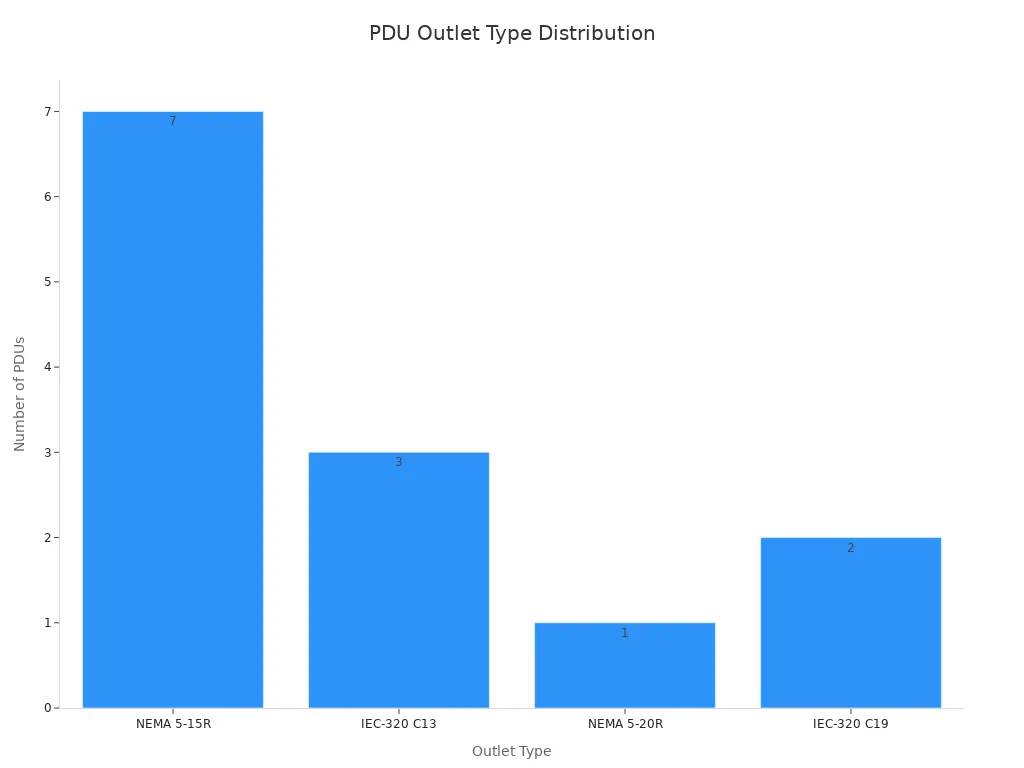
C13 and C19 outlets are common for server equipment. C13 outlets are standard for IT equipment, typically rated for 10 Amperes at 250 AC Volts. C19 outlets handle higher power demands, rated for 16 Amperes at 250 AC Volts, and have a larger design. A common configuration includes 2 C19 and 12 C13 outlets. Some high-density PDUs can fit as many as 42 C13 outlets. The chart below illustrates the distribution of common PDU outlet types.
Form Factor and Mounting Options for a Basic PDU
Horizontal Rackmount Basic PDU
Horizontal rackmount PDUs install within the standard 1U (1.75 inches) of space in EIA-standard 19-inch racks. This form factor is common for distributing power across a rack.
- It mounts horizontally in 1U of space in EIA-standard 19-inch racks.
- Users can mount it on a wall, workbench, or under a counter.
- It supports vertical 0U rack-mounting with an optional accessory.
Vertical Rackmount Basic PDU
Vertical rackmount PDUs, also known as 0U PDUs, mount vertically along the side of a server rack. This design saves valuable horizontal rack space for IT equipment. It also helps with cable management and improves airflow.
Wall-Mount and Under-Desk Basic PDU
Wall-mount and under-desk PDUs offer flexible power solutions outside of traditional server racks. Businesses use them for individual workstations, network closets, or areas with limited space. They provide convenient power access without occupying floor or rack space.
Essential Protection Features in a Basic PDU
Surge Suppression (Joules Rating)
Basic PDUs often include surge suppression, a critical feature protecting sensitive IT equipment. Power surges, sudden increases in voltage, can damage electronics. Surge suppression diverts this excess voltage, safeguarding connected devices. The joules rating indicates a PDU’s capacity to absorb surge energy. A higher joules rating offers greater protection. For instance, a basic PDU with ISOBAR surge protection, designed for network-grade IT environments, offers a 3840 joule rating. This defends against power surges, spikes, and line noise. It distributes AC power through 12 NEMA 5-20R and two 5-15R outlets.
For sensitive server equipment, a high joule rating, such as 2000 joules, provides robust defense against power surges. This prevents costly downtime and hardware failures, ensuring continuous operation of critical systems.
| アプリケーションシナリオ | Recommended Joule Rating (J) |
|---|---|
| Small Electronic Devices | 1,000–2,000J |
| Home Entertainment Equipment | 2,000–3,000J |
| High-End Electronics & Workstations | 3,000–6,000J |

Overload Protection (Circuit Breakers)
Circuit breakers in basic PDUs protect connected devices from overcurrent conditions. They employ various delay curves to distinguish between normal inrush currents and damaging overcurrents. Hydraulic-magnetic circuit breakers are particularly effective. They offer a two-step response. They provide a delay for normal overcurrents, preventing nuisance tripping from temporary surges like server inrush currents. However, they trip quickly on short circuits to prevent damage. Unlike thermal or thermal-magnetic breakers, hydraulic-magnetic types are not affected by ambient temperature. This makes them suitable for warm IT environments. They protect equipment from short circuits without causing power loss due to typical, non-damaging overcurrent events.
Build Quality and Durability of a Basic PDU
Robust Metal Casing
The build quality of a basic PDU significantly impacts its longevity and reliability. A robust metal casing protects internal components from physical damage and environmental factors. High-quality materials like aluminum alloy or steel are commonly used in 1U PDUs. These materials resist wear, impact, and corrosion. For example, the NBYOSUN Switch 13A Output PDU 6 Port features an aluminum alloy housing. The Tripp Lite PDUMH20HV uses steel construction. Other models, like the APC AP7900 and CyberPower PDU20B2F12R, also feature durable metal housing.
| pduモデル | ケースマテリアル |
|---|---|
| Vertiv Geist VP7551 | Heavy steel chassis |
| Tripp Lite PDU1230 | 頑丈なすべての金属ケース |
| サイバーパワーPDU20B2F12R | Durable metal housing |

ケーブル管理機能
Effective cable management features enhance the functionality and safety of a basic PDU. These features help organize power cords, reducing clutter and improving airflow within a rack or workspace. Common cable management elements include integrated cable ties, retention clips, or designated routing channels. Proper cable management simplifies maintenance, prevents accidental disconnections, and contributes to a cleaner, more efficient IT environment.
How to Select the Right Basic PDU for Your Needs
Businesses must carefully consider several key features when selecting a power distribution unit. Matching the PDU’s capabilities to specific IT infrastructure needs ensures efficient power delivery. It also protects valuable equipment.
Assessing Your Power Requirements for a Basic PDU
Calculating Total Device Wattage
To select the correct PDU, businesses must accurately calculate their IT equipment’s total power consumption. This prevents overloading and ensures stable operation.
- Look at Your Device’s Power Ratings: Find the rated power in watts on the device’s label, user manual, or by researching the model online. Alternatively, use the formula Watts = V x A if power is listed in amps (A) and voltage (V). Appliance wattage varies significantly, so check each device.
- Calculate the Watts Your Devices Use Each Day: Multiply the device’s rated wattage by the number of hours it runs daily to find the Watt-hours (Wh) per day. For example, a 1200W microwave used for 0.5 hours daily consumes 600Wh.
- Add Up the Total Watt-hours: Sum the daily Watt-hours for all devices to determine the total daily energy requirement for your setup. For instance, if a microwave uses 600Wh, a computer 2,000Wh, and a fan 600Wh, the total daily requirement is 3,200Wh.
- To calculate Watts from Amps and Volts: Watts = V x A (where V is voltage and A is amperes).
- To calculate Watt-hours (Wh) per day: Device Wattage (watts) X Hours Used Per Day = Watt-hours (Wh) Per Day.
Planning for Future Expansion
Businesses should always plan for future growth when assessing power needs. Overestimating current requirements slightly helps accommodate new equipment without needing a PDU replacement. Allocating an extra 20-30% capacity provides a buffer for future expansion. This proactive approach saves time and resources in the long run.
Matching a Basic PDU to Your IT Infrastructure
Rack Size and Available Space
The physical dimensions of a server rack directly influence the PDU form factor choice.
- Horizontal Rackmount PDUs: These are available in 1U or 2U sizes. They mount horizontally within the rack.
- Vertical PDUs (0U PDUs): These do not occupy any rack unit space (‘0U’) within the mounting rails. They typically mount on the flanks inside the server rack. The choice of PDU form factor is directly influenced by rack unit (RU) availability. Horizontal PDUs, also known as rackmount PDUs, mount horizontally. They typically occupy 1U or 2U of rack space. This necessitates careful planning of cabinet space to ensure sufficient room after installing servers and networking gear. In contrast, vertical PDUs, often referred to as ‘Zero U’ PDUs, mount vertically. They do not consume any rack unit space within the mounting rails. This makes them a preferred option when horizontal rack space is limited. They do not interfere with other mounted equipment. They are designed with a low profile to facilitate access and efficient airflow.
Number of Devices to Power
Businesses must count the exact number of devices requiring power. The chosen PDU should offer enough outlets for all current equipment. It should also include a few spare outlets for future additions. This ensures flexibility and avoids the need for additional power strips.
Budget Considerations for a Basic PDU
Cost-Effectiveness vs. Features
When selecting a PDU, businesses must balance cost with necessary features. Basic PDUs offer a cost-effective solution for essential power distribution. They provide reliability without the higher price tag of advanced models. Businesses should focus on core functionalities like power capacity and outlet types. They should avoid paying for features they do not need. This approach ensures optimal value for money.
| pduモデル | 価格帯 |
|---|---|
| APC Rack PDU, Basic, Zero U, 15A | $258 – $373 |
| APC Rack PDU, Basic, Zero U, 20A | $376 – $564 |
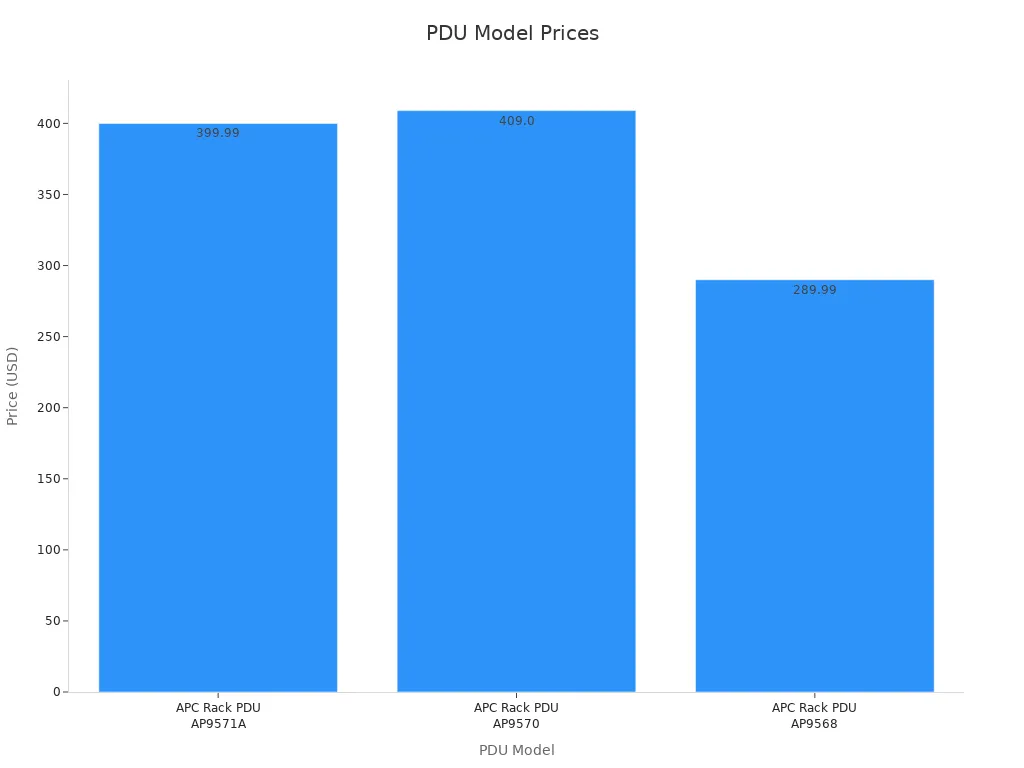
| モデル | 価格 |
|---|---|
| APC Rack PDU AP9571A | $399.99 |
| APC Rack PDU AP9570 | $409.00 |
| APC Rack PDU AP9568 | $289.99 |
Long-Term Value and Reliability
The long-term value of a PDU depends heavily on its reliability and durability. A quality PDU minimizes downtime and replacement costs. Tripp Lite basic PDUs are noted for their affordability, durability, and reliability. They come with a 5-year warranty. This makes them a popular choice, especially among small businesses. Several metrics quantify a power supply’s expected reliability:
- Mean Time Between Failure (MTBF): This metric quantifies a power supply’s expected reliability. It measures the average time between successive failures during normal operation. A higher MTBF indicates a longer period of dependable operation before random failures are likely to increase.
- Service Life: This refers to the duration a power supply is expected to perform without significant failures. It reliably delivers electrical power without compromising efficiency or safety. It is the operational window where the product is expected to function as intended.
- 保証: The warranty period provided by a manufacturer reflects their confidence in a product’s reliability and durability. A longer warranty often correlates with a higher MTBF. It signifies the manufacturer’s trust in the product’s extended performance and resistance to random failures.
Scalability and Future-Proofing with a Basic PDU
Businesses must consider future needs when investing in IT infrastructure. A PDU choice impacts the ability to scale operations efficiently. Selecting a PDU with scalability in mind prevents costly replacements and ensures long-term compatibility.
Accommodating Growth in Equipment
Businesses frequently expand their IT equipment. A well-chosen basic PDU accommodates this growth without requiring immediate upgrades. IT managers should select a PDU with more outlets than currently needed. This provides spare capacity for new servers, switches, or other devices. For instance, if a small business currently uses six outlets, choosing a 10- or 12-outlet PDU offers room for expansion. This proactive approach saves time and resources. It avoids the need to purchase additional power strips or replace the entire PDU as the infrastructure grows. Planning for future power demands also involves considering the PDU’s total amperage rating. Selecting a PDU with a slightly higher amperage than current requirements ensures it handles increased loads from new equipment. This strategy supports a growing IT environment effectively.
既存のシステムとの互換性
Ensuring a basic PDU integrates seamlessly with existing IT systems is crucial. Businesses must verify the PDU’s input plug type matches the available power source. Common input plugs include NEMA 5-15P for standard 15A circuits or NEMA 5-20P for 20A circuits. The PDU’s output outlets must also match the equipment it powers. Standard NEMA 5-15R outlets suit most desktop devices. However, server equipment often requires IEC C13 or C19 outlets. A PDU offering a mix of these outlet types provides greater versatility. Furthermore, the PDU’s form factor must fit the physical environment. Rackmount PDUs integrate into server racks. Vertical PDUs save horizontal rack space. Desktop or under-desk units suit workstations. Selecting a PDU compatible with existing power infrastructure and equipment prevents installation issues and ensures immediate functionality.
Installation and Best Practices for Your Basic PDU
Proper installation and adherence to best practices ensure the reliability and longevity of a basic PDU. These steps also safeguard connected IT equipment. Businesses must prioritize careful setup and ongoing maintenance.
Proper Mounting Techniques for a Basic PDU
Securing Rackmount Basic PDUs
Securing rackmount basic PDUs correctly prevents safety hazards and operational problems. Improper mounting can lead to short circuits and power outages. Secure mounting brackets are essential for both vertical and horizontal PDU installations. Detachable and toolless brackets offer flexibility and ease of installation. Reversible housings allow for optimal outlet placement. Secure mounting prevents movement and minimizes strain on power cords, ensuring long-term reliability. Always securely mount vertical PDUs using the correct brackets to ensure stability and prevent shifting.
Effective Cable Routing
Effective cable routing is crucial for a safe and organized PDU installation. Businesses should plan cable routes thoroughly. They can use cable raceways, trays, and conduits for protection and organization. Securing cables with ties and clips avoids overtightening. Segregating power and data cables reduces electromagnetic interference. Providing service loops offers flexibility. Clearly labeling all cables simplifies identification and troubleshooting. Using protective accessories like grommets and sleeves prevents cable damage. Well-managed cables improve airflow, reduce accidental disconnections, and simplify future upgrades. Route cables carefully to prevent overstretching and unnecessary strain. This prevents damage and signal loss.
Overload Prevention with a Basic PDU
Calculating Load Distribution
Calculating load distribution accurately prevents PDU overloads. Businesses must sum the wattage of all connected devices. This total wattage should not exceed 80% of the PDU’s maximum capacity. This provides a safety margin. Overloading a PDU can trip circuit breakers or damage equipment.
Balancing Power Across Outlets
Balancing power across outlets ensures stable operation. Businesses should distribute high-power devices evenly among the PDU’s outlets. Avoid plugging all high-draw equipment into a single section of the PDU. This practice prevents localized overloads. It also maintains consistent power delivery to all connected IT gear.
Maintenance Tips for a Basic PDU
定期的な目視検査
Regular visual inspections are key to ensuring all PDU components function correctly. These inspections identify any wear or damage requiring repair. Businesses should look for burning smells or hot-to-the-touch circuit breakers. They must also check for visible damage like scorch marks, melted plastic, or cracks. Inspect the PDU chassis for discoloration, warping, or deformities. Gently press on each power cord to ensure it is fully seated and secure. Inspect the area around the PDU to ensure no cables obstruct ventilation and proper airflow. Observe the PDU status LEDs for green (normal operation) or amber/red (potential problems like overload or internal faults).
Environmental Considerations for Longevity
Environmental factors significantly impact a PDU’s longevity. Businesses should ensure the PDU operates within its specified temperature and humidity ranges. Excessive heat or moisture can degrade components. Maintaining a clean environment, free from dust and debris, also prevents overheating and extends the PDU’s lifespan.
Where to Acquire Reliable Basic PDU Solutions
Businesses must source basic PDU solutions from reputable channels. This ensures product quality, reliable performance, and adequate support. Selecting trusted manufacturers and authorized distributors minimizes risks and safeguards IT infrastructure investments.
Reputable Manufacturers and Brands
Tripp Lite Basic PDU Offerings
Tripp Lite consistently provides a wide array of basic PDU solutions. Their products cater to various IT environments, from small offices to larger data centers. Tripp Lite PDUs are known for their robust construction and straightforward functionality. They offer dependable power distribution without complex features, making them a popular choice for essential power needs.
イートンの基本 PDU ソリューション
Eaton stands as another leading provider of power management solutions. Their basic PDU offerings deliver reliable power to critical IT equipment. Eaton PDUs often feature durable designs and essential protection mechanisms, such as circuit breakers. Businesses trust Eaton for consistent performance and adherence to industry standards.
Server Tech Basic PDU Options
Server Technology, now a part of Legrand, specializes in advanced power distribution. They also offer a range of basic PDU options. These units provide foundational power delivery with the same quality and engineering found in their more sophisticated products. Server Tech basic PDUs are suitable for environments demanding high reliability.
Authorized Resellers and Distributors
Online IT Hardware Retailers
Online IT hardware retailers offer a convenient way to purchase basic PDUs. These platforms typically feature extensive product catalogs, competitive pricing, and customer reviews. Businesses can easily compare models and specifications from various manufacturers. Reputable online retailers often provide detailed product information and efficient delivery services.
Local IT Supply Stores
Local IT supply stores provide immediate access to basic PDU solutions. They offer the advantage of in-person consultation and quick procurement. For urgent needs or specific local requirements, these stores can be invaluable. They often stock common PDU configurations and provide personalized service.
Warranty and Support for Your Basic PDU
Understanding Manufacturer Warranties
Understanding the warranty terms for a basic PDU is crucial. Many PDU manufacturers typically offer a two-year warranty for these devices. However, some experts suggest these devices should last longer. They recommend that intelligent PDUs ideally come with a warranty period of three to five years. For instance, PDU Expert (PDUeX) provides a standard two-year warranty for all its Power Distribution Units (PDUs), starting from the purchase date. Customers also have the option to buy extended warranty support. This extended coverage offers additional peace of mind.
Accessing Technical Support
Accessing reliable technical support ensures smooth operation and quick resolution of any issues. Manufacturers and resellers offer various support channels.
- Customers can often reach technical support via a dedicated phone number, such as 1.877.297.6937.
- Many providers also offer the option to submit a support ticket online.
- Additional resources include:
- FAQs
- Product Manuals
- Firmware Downloads
- Advisory Notices
- Glossaries
- Information on Warranties, Returns, and End-of-Life Products
- Online Help
These resources empower users to troubleshoot common problems and find detailed product information.
Basic Power Distribution Units play an indispensable role in any small business or home lab IT infrastructure. They provide reliable power distribution and essential overload protection, safeguarding valuable equipment. Businesses must carefully consider power capacity, outlet types, and form factors for informed PDU selection. Choosing the right Basic PDU empowers IT setups with stable, organized power, ensuring operational continuity and protecting critical investments.
よくある質問
基本的な PDU の主な機能は何ですか?
A basic PDU primarily distributes electrical power from a single source to multiple IT devices. It acts like a robust power strip for server racks or workstations. This ensures each piece of equipment receives the necessary electricity to operate.
Do basic PDUs offer battery backup during power outages?
No, basic PDUs do not provide battery backup. They only distribute power. For protection against power outages, businesses need an uninterruptible power supply (UPS). A UPS supplies temporary power when the main power fails.
How does one determine the correct amperage for a basic PDU?
Users determine the correct amperage by calculating the total wattage of all connected devices. The PDU’s amperage rating should exceed this total. This provides a safety margin and prevents overloading.
Is it safe to connect multiple basic PDUs together in a series?
Connecting multiple basic PDUs in a series, known as daisy-chaining, is generally not recommended. This practice can lead to circuit overloads and potential safety hazards. Each PDU should connect directly to a dedicated power source.
What is a 0U PDU, and why is it beneficial?
A 0U PDU mounts vertically along the side of a server rack. It does not occupy any horizontal rack unit space. This design saves valuable rack space for IT equipment. It also improves cable management and airflow.
Do basic PDUs require special electrical wiring?
Most basic PDUs use standard electrical plugs (e.g., NEMA 5-15P or 5-20P). They connect to existing wall outlets or UPS units. Higher amperage PDUs might require specific outlet types, but they do not typically need special wiring.
How often should a basic PDU be replaced?
Basic PDUs are built for durability and reliability. They do not have moving parts. They typically last many years. Users should replace a PDU if it shows signs of damage, such as scorch marks or frequent circuit breaker trips.
💡 ヒント: Regular visual inspections help identify potential issues early.
 Japanese
  English
  Russian
  Spanish
  Portuguese
  Korean